LS25 WayPoint GPS v1.0.0.0


LS25 WayPoint GPS v1.0.0.0
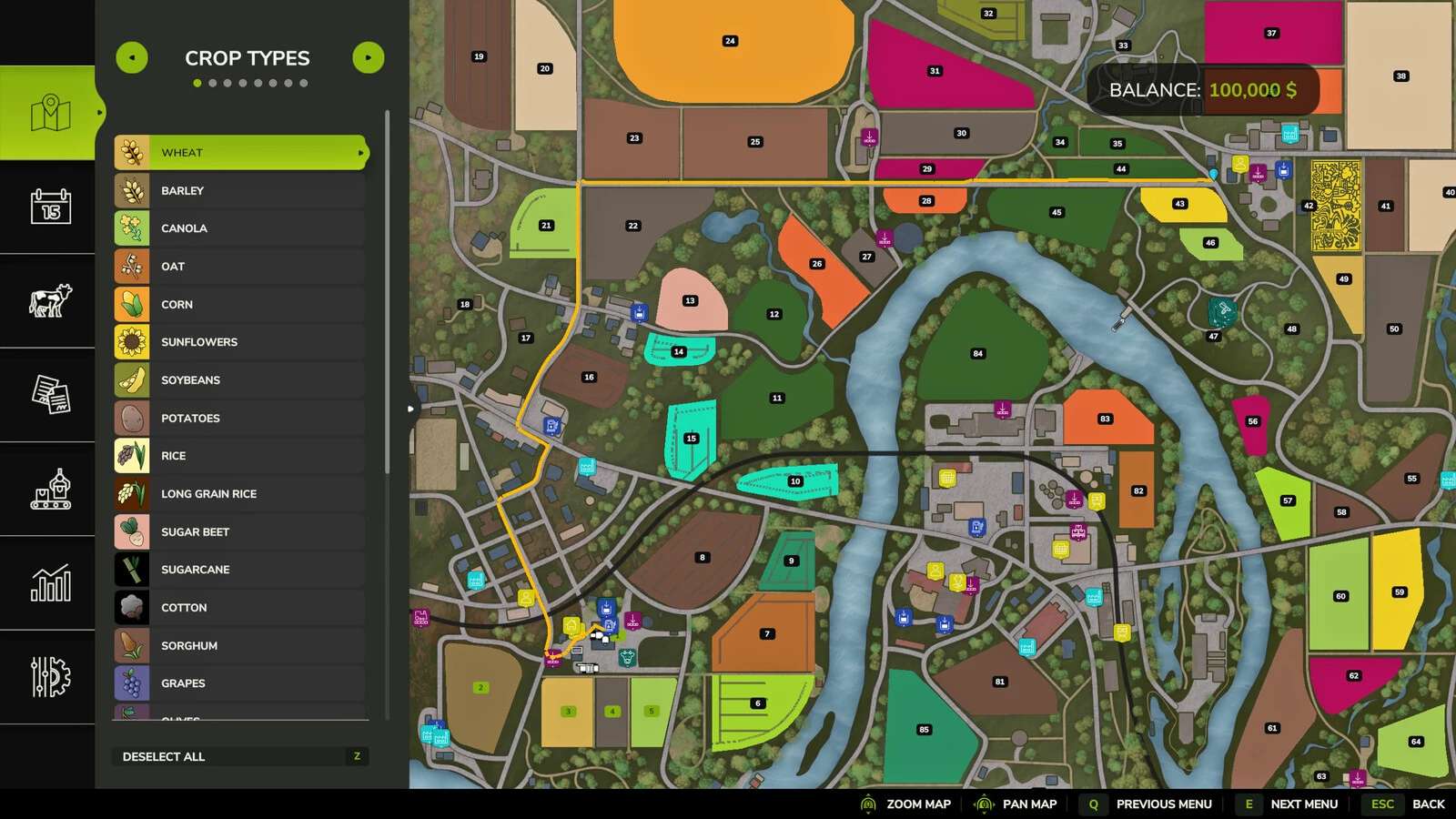
WayPoint GPS lets you set a simple GPS target directly from the ESC map.
Open the full map, hold CTRL, and click where you want to go. The mod draws a clean GPS route on the minimap and ESC map.
Features:
– Native WayPoint GPS route graphs
– CTRL-click target setting on the full ESC map
– Multiple waypoint support
– Minimap route line
– Configurable route line color, waypoint color, thickness, visibility, and marker display
Default controls:
– Set/add waypoint: Full ESC map + CTRL + left click
– Remove last waypoint: Full ESC map + SHIFT + left click
– Toggle route display: Right Shift + G
– Open settings: Right Shift + B
– Toggle on-screen arrow: Left Alt + B
– Cycle route color: Right Shift + C
– Clear target: Left Ctrl + X
Important:
Route guidance is a map aid only, not a guarantee. Some maps, bridges, islands, ferry crossings, yard roads, traffic, tools, and off-road targets may produce imperfect, longer, or unexpected routes. Always check the line and stay in control of the vehicle.
Special thanks to Cavote88 for testing.